
Power Apps Native Mobile Apps: Build for iOS and Android with AI
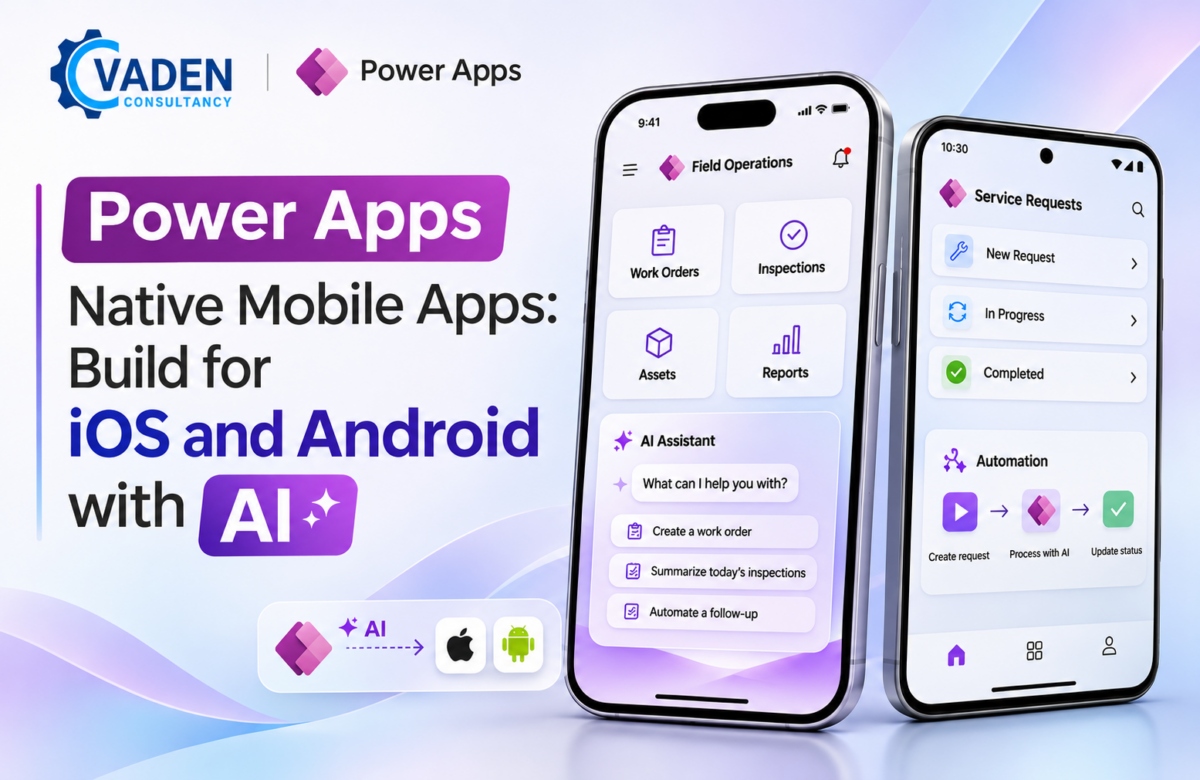
Ask anyone who runs a service team what happens at 5 pm. The engineers come back from customer sites, open a laptop and start typing up the day. Part-numbers get guessed, photos get emailed to themselves, and the Dynamics 365 record ends up half as useful as the visit itself. Nobody is lazy here. The system just wasn’t in their hand when the work happened.
A phone app fixes that, but building one has always been a project of its own: separate iOS and Android skills, app store accounts, sign-in headaches, and a long wait before anyone in the field sees anything.
Here’s where Microsoft’s new preview comes in. Tell an AI coding agent what the app should do, and it puts together a plan for you to review. Say yes, and it generates a real iOS and Android project, already linked to Dataverse. Same-day testing on your own phone is realistic.
What you actually get
The output is a standalone mobile app, written in React Native, Expo and TypeScript. An AI coding agent produces it through Microsoft’s mobile-app plugin. You describe the app, read a plan, approve it, and only then does the project get generated.
Microsoft’s overview lists the building blocks:
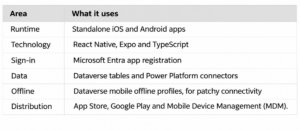
The approval step is what separates this from “ask an AI for an app and hope”. Nothing gets created in your environment until you’ve signed off on the plan.
Where it sits next to canvas and model-driven apps
If your team does Power Apps development already, you know the usual choices: canvas apps for quick, flexible screens, model-driven apps for process-heavy work on Dataverse. Native apps are a third option, and a more demanding one.
Microsoft says to consider it when speed of response is critical, when you need deep hardware access (advanced camera controls, sensors, Bluetooth, NFC, background tasks, widgets), when the app has to feel exactly like a platform-native one, or when you’re committing to a single platform for the long run.
The documentation is just as direct about the other side. Native apps aren’t recommended for minimum viable product work. If you need a simple form for a handful of users by Friday, a canvas app in the mobile player is still the quicker route, and probably the cheaper one to maintain.
Check these before you begin
Most failed first attempts come from the setup, not the AI. The requirements from Microsoft’s overview:
On your computer you need Node.js 24 (LTS), Git 2.30 or later, and one supported AI host: GitHub Copilot CLI, Visual Studio Code with Copilot Chat, or Claude Code. Running node –version and git –version tells you where you stand.
In the Power Platform environment, Dataverse must be enabled if the app stores data there, and you need the System Customizer role (or equivalent) to create tables. Ask your admin early about the app registration, Wrap, and offline profile publishing. Those three usually involve someone with more access than you.
On the phone, install Microsoft’s developer preview app from the App Store or Google Play, and keep the phone and computer on the same network.
One small thing worth knowing: the Power Platform CLI and the Azure CLI keep separate sign-in caches. Logging in to one does nothing for the other, so you’ll sign in twice.
The build, start to finish
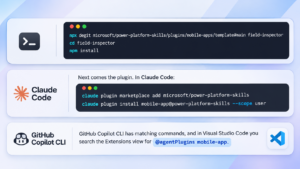
Set up the project and the plugin
Microsoft’s quickstart starts from a template. The folder name is up to you; the example uses field-inspector.
Describe what you want
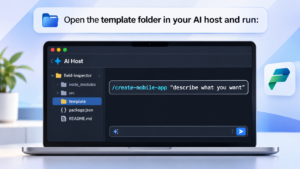
The description matters more than people expect. Microsoft’s own examples are specific: a retail app where staff scan products with the native barcode scanner, or a delivery app that tracks driver locations on a map. Say who uses the app, what they record, which tables are involved and which device features you need. “An inspection app” will give you something generic. “Technicians log a site, a date, a result of pass, fail or follow-up, notes and photos, linked to an existing Account” gives the agent something to plan around.
You’ll also sign in with an account that can reach the target environment.
Read the plan properly
This is where you spend your time. The plugin writes a file called native-app-plan.md and stops at four gates:
- Data model. Tables, columns, relationships and alternate keys, with an entity relationship diagram.
- Native capabilities. Camera, scanner, GPS and the like.
- First-party and custom connectors included in the solution.
- Screen specs and navigation, plus a visual preview in _plan_preview.html before any code exists.
Changing a column here costs you a sentence. Changing it after Dataverse tables are created costs you a lot more. The approved plan is also kept and reused when you edit the app later.
Sort out sign-in
The plugin finds the Microsoft Entra tenant behind your environment and gives you three options: open the registration page and paste back the client ID, reuse a client ID from a Wrap-configured registration, or postpone it with /set-app-registration-native. Whichever you pick, finish it before anyone signs in on a device.
Let it generate, then try it on a phone
After approval the plugin builds a design system, initializes the project, creates or reuses the Dataverse tables, adds connectors, writes wrappers for the approved device features, generates the screens and runs TypeScript checks. Apps with offline profiles or several connectors take longer, since Dataverse metadata operations can slow down when other platform activity is going on.
Then start the dev server:
npm run dev
Scan the QR code with the developer app on your phone and sign in. Edits to files in the app/ folder show up on the device through hot reload, so there’s no full rebuild between tweaks.
Change it and ship it
Changes after the first build go through slash commands, and each one is logged in memory-bank.md.
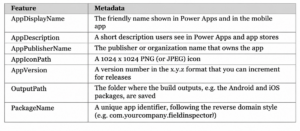
When you’re happy, /deploy publishes the app to the environment recorded in power.config.json. A few early walkthroughs mention the first deployment taking two rounds, because the app ID only exists after the first push. That’s a community report, so check it in your own tenant.
What doesn’t work yet
This is a preview, and Microsoft states plainly that preview features aren’t meant for production use. The current gaps are push notifications, AI-first controls built through agent integration with Copilot Studio, Power Automate flow integration, converting existing canvas apps into native ones, and Apple CarPlay.
The flow integration gap deserves a second look. If your field process leans on a flow to send an approval or update a record after submission, you’ll need another route for now, such as logic on the Dataverse side.
Advice for a first project
Keep the first app small. One table, one or two device features, three or four screens. You’ll learn how the plugin thinks without untangling a big plan.
Reuse standard tables like Account where you can, instead of building parallel ones. Ask only for the device features the app truly needs, since each one adds a wrapper and a permission prompt for the user. Decide early whether you’ll distribute through the app stores or through MDM such as Intune, because that decision brings in different people. And when something breaks, Microsoft keeps a separate troubleshooting page for native apps. Save the link before something breaks.
So, is it ready for your team?
For a pilot with a small field team, or a technical evaluation, yes, it’s worth a few hours. The plan-first approach makes the generated work easy to review, and the data lands in Dataverse, where your Dynamics 365 users and reports already look.
For a company-wide rollout, wait. Let the preview label drop, test offline behavior on real devices in real conditions, and compare the limitations against what your process can’t live without.
Talk to Vaden Consultancy
Choosing between canvas, model-driven and native, or scoping a mobile pilot for a field team, is easier with someone who has seen the trade-offs. Vaden Consultancy works across Dynamics 365, Business Central and Power Platform Solutions. Write to us at [email protected] and we’ll help you size it up.
Frequently Asked Questions
What are native mobile apps on the Microsoft Power Platform?
Standalone iOS and Android apps written in React Native, Expo and TypeScript. You describe the app to an AI coding agent, approve its plan, and the mobile-app plugin generates the project, which talks to Dataverse tables and Power Platform connectors.
Can I use native apps in production today?
Not yet. It’s a preview, and Microsoft says plainly that preview features aren’t meant for production use. Pilots and evaluations are fair game.
Which AI tools work with the mobile-app plugin?
GitHub Copilot CLI, Visual Studio Code with Copilot Chat and Claude Code. Those are the three Microsoft lists.
Can I turn an existing canvas app into a native app?
No, conversion isn’t supported. Anything you want as a native app starts from a fresh description and plan.
Does a native app work offline?
Yes, through Dataverse mobile offline profiles, which are meant for field work with weak signal. The catch is that publishing and assigning those profiles usually needs an admin, so bring yours in early.
Do I need an Entra app registration?
Yes, because sign-in depends on it. Finish it before the first device sign-in. The plugin can open the registration page for you, or you can come back to it with /set-app-registration-native.
How do I distribute the finished app?
App Store, Google Play or MDM. Pick the route before the pilot, because each one pulls in a different set of people.
What is not supported yet?
Push notifications, Power Automate flow integration, AI-first controls built through agent integration with Copilot Studio, conversion of existing canvas apps, and Apple CarPlay. If your process leans on any of these, plan around the gap.
Do I still need a developer if an AI agent writes the app?
For review, yes. What the agent hands back is an ordinary React Native, Expo and TypeScript project, and someone who knows that stack should read it before real users get it.
Follow VADEN Consultancy on LinkedIn for more insights on Microsoft Dynamics 365, Business Central, Power Platform, Power BI, AI, Azure Cloud, CRM, ERP, automation, cybersecurity, and business technology.