
Service Agent in Microsoft 365 Copilot: What It Means for Your Dynamics 365 Customer Service Operations
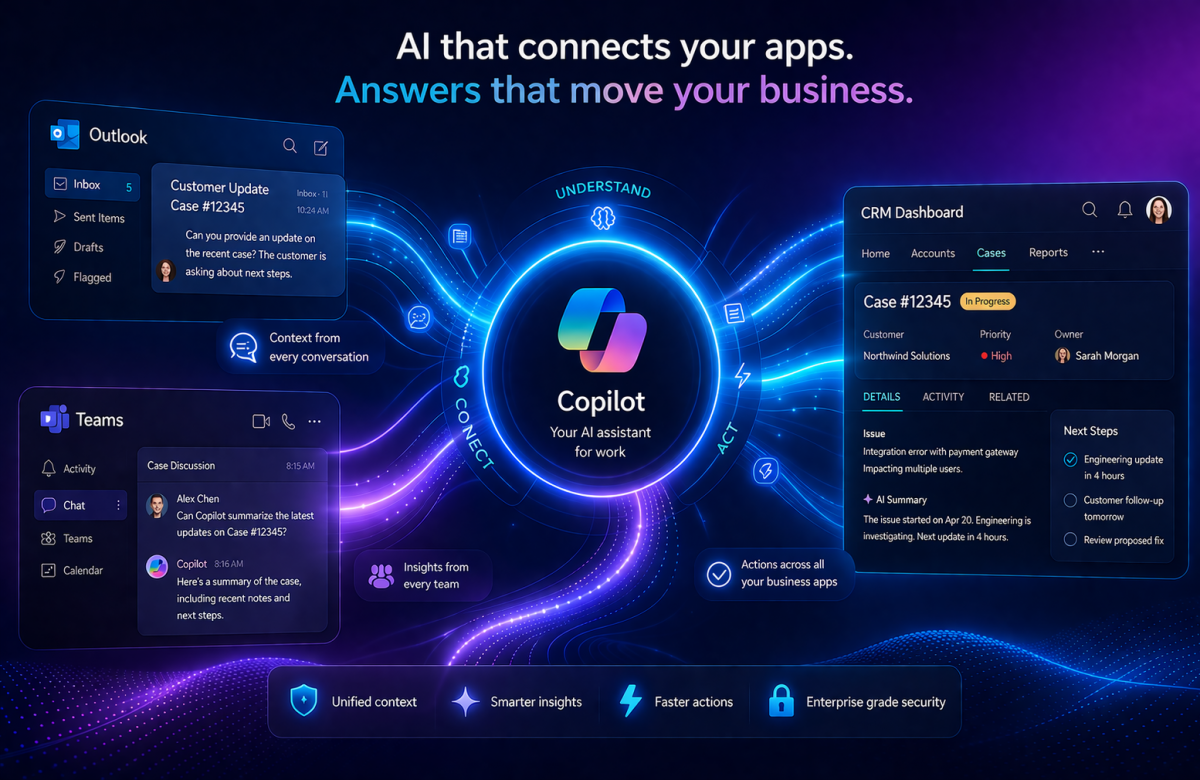
Customer service has always been a balancing act. Agents juggle multiple systems, switch between tabs, hunt through knowledge bases, and still try to give customers the fast, accurate answers they deserve. For years, businesses running Dynamics 365 Customer Service have been asking a straightforward question: what if all of this could happen in one place?
Microsoft has answered that question, and the answer is Service Agent in Microsoft 365 Copilot.
At Vaden Consultancy, we’ve been watching this space closely, and this announcement is one of the most significant developments in the Dynamics 365 ecosystem in recent memory. In this post, we want to break down exactly what Service Agent is, how it works, why it matters for service-driven organizations, and what IT leaders should know before getting started.
The Problem Service Teams Have Been Living With
Let’s be honest about the day-to-day reality for most customer service professionals. A typical agent might start their morning by checking email in Outlook, then switch to Dynamics 365 to pull up open cases, hop over to SharePoint to find a relevant knowledge article, jump back into Teams to ask a colleague a quick question, and then return to their CRM to update the case record. Each of these switches costs time. Collectively, they cost a lot more than that they cost focus, accuracy, and customer satisfaction.
This tool fragmentation isn’t a failure of any individual product. It’s just what happens when enterprise software evolves organically over time. But the expectation from customers has never been more demanding. People want fast resolutions, and they want to feel like the person helping them actually knows their history.
Service Agent was built to close this gap.
What Is Service Agent in Microsoft 365 Copilot?
Service Agent is a declarative agent that runs natively inside Microsoft 365 Copilot. It’s purpose-built for customer service scenarios and designed to be the single surface where service professionals can think, research, act, and communicate without ever leaving their Copilot experience.
What makes it different from earlier AI tools is how it bridges two worlds that have historically operated separately:
- Microsoft 365 data — Outlook emails, Teams conversations, SharePoint documents
- Dynamics 365 Customer Service data — cases, customer history, knowledge articles, service records
By grounding Copilot in both of these data sources simultaneously, Service Agent gives agents something genuinely new: full context without context switching. As Microsoft describes it, service professionals can interact with cases, knowledge, and service workflows using natural language right from Copilot.
This isn’t just a chatbot sitting on top of your CRM. It’s an intelligent layer that understands what’s happening across your entire business communication stack and connects it to your service data in real time.
Core Capabilities Now Available in Public Preview
Microsoft has released Service Agent in public preview, and the initial set of capabilities is already substantial. Here’s a closer look at what service teams can do today.
Case Understanding and Summarization
One of the most time-consuming parts of case management is simply getting up to speed especially when an agent picks up a case mid-stream or after a handover. Service Agent can instantly generate rich summaries of customer cases, drawing in context from previous interactions and related knowledge articles. What used to take five minutes of reading through a case thread can now happen in seconds.
This also matters for supervisors and team leads who need to quickly assess case complexity or monitor queue health without diving into every record individually.
Case Prioritization and Workload Awareness
Rather than manually sorting through a queue and making judgment calls about what to tackle first, agents can simply ask Copilot what needs attention now. Service Agent enables case prioritization and workload awareness based on customer signals and service data, so agents are always working on the right thing at the right time — not just the oldest thing in the queue.
This kind of intelligent prioritization is especially valuable in high-volume environments where misallocated attention can directly translate to SLA breaches and customer churn.
Service Knowledge Retrieval
Knowledge management is one of the perennial challenges in customer service. Agents often know that the answer exists somewhere, but finding the right article quickly under pressure is a different matter. Service Agent solves this by enabling agents to get relevant answers grounded in both Dataverse and SharePoint content directly within Copilot without having to navigate to a separate portal or run a manual search.
This tighter integration between knowledge management and the agent workspace is something Dynamics 365 customers have been asking for, and Service Agent delivers it in a natural, conversational way.
Data Updates and Workflow Initiation
Here’s where Service Agent moves beyond being a read-only assistant. Agents can make updates to service records, add case notes, and initiate workflows such as child case creation without leaving Copilot. This is a meaningful shift from an AI that answers questions to an AI that actually helps you get work done.
The practical implications are significant. Agents spend less time navigating to the right form, filling in the right fields, and clicking through the right screens. They describe what they need in plain language, and the system acts.
Cross-App Continuity with Shared Memory
One of the underappreciated capabilities in Service Agent is how it maintains context across applications. Service professionals can move seamlessly between Teams, Outlook, and Dynamics 365 Customer Service while maintaining shared memory and chat history.
If an agent was reviewing a case summary in Outlook and then switches to the Dynamics 365 Customer Service workspace, the conversation history and context travel with them. This shared memory model is what transforms Copilot from a session-based tool into something closer to a genuine working partner.
Why This Is a Strategic Shift, Not Just a Feature Update
It’s worth stepping back and understanding what Microsoft is signaling with this release. Service Agent isn’t simply a new feature inside Dynamics 365 Customer Service. It represents a deliberate architectural shift in how Microsoft thinks business applications should work.
The underlying philosophy, as described in Microsoft’s announcement of what they’re calling the “frontier transformation,” is that instead of switching between applications, users state what they need in Copilot and the system responds you can review data and take action without leaving the conversation.
This is a fundamentally different model of enterprise software. Instead of training users to navigate complex application hierarchies, the interface becomes conversational. The system meets the user where they already are in Microsoft 365 Copilot and brings the capabilities of specialized business applications to them.
For IT leaders at organizations already invested in Dynamics 365, this is important context. Service Agent isn’t asking you to replace your existing infrastructure. It’s designed to sit on top of it and make it more accessible and actionable for the people who use it every day.
Enterprise-Grade by Design
Security and compliance are understandably top of mind for any enterprise rolling out AI capabilities. Service Agent is grounded in Microsoft 365 Copilot with enterprise-grade security and compliance, aligned with existing Dynamics 365 Customer Service investments.
It also builds on familiar Copilot and Dynamics management models, which means IT administrators don’t need to learn an entirely new governance framework to deploy and manage it. The extensibility roadmap is also forward-looking Microsoft has indicated that Service Agent will expand to support additional skills, apps, and workflows over time.
What This Means for Vaden Consultancy Clients
At Vaden Consultancy, we work with organizations at every stage of their Dynamics 365 CRM journey from initial implementation through to advanced customization and optimization. Service Agent is relevant to all of them, but the conversation looks different depending on where a client currently sits.
For organizations just beginning their Dynamics 365 Customer Service journey, this is an exciting moment to get started. The platform you’re onboarding into is now one where AI isn’t bolted on as an afterthought it’s integral to the experience from day one. Getting the foundational data structures, case management workflows, and knowledge management practices right from the start will determine how much value you can extract from capabilities like Service Agent.
For organizations already running Dynamics 365 Customer Service, the priority is understanding what Public Preview access means for your team and beginning to evaluate Service Agent in your environment. Now is the time to review your knowledge base hygiene (Service Agent is only as good as the knowledge it can access), your case data quality, and your team’s readiness to adopt a more conversational way of working.
For IT leaders managing Microsoft 365 and Dynamics 365 environments, the administrative considerations are worth planning for now. Enabling Service Agent requires connecting Microsoft 365 Copilot to Dynamics 365 Customer Service through the Power Platform admin center. Understanding the licensing model and data governance implications before you begin is essential.
How to Get Started with Service Agent
Service Agent is now in public preview, so your team can start exploring it in a real environment right now. Before you dive in, here are three things to take care of first.
Sort out your licensing. You will need both Dynamics 365 Customer Service and Microsoft 365 Copilot licenses active. These two work together, so it is worth double-checking that your current plan covers both before you begin.
Turn it on the right way. Enabling Service Agent is not just flipping a switch. You will need to configure the Copilot connection inside Dynamics 365 Customer Service and make sure your team’s experience profiles are set up correctly. Microsoft’s public preview documentation walks you through this step by step.
Check your data before anything else. This is the step most teams skip — and the one that matters most. Service Agent pulls from your case records, knowledge articles, and customer history. If that data is outdated, incomplete, or poorly structured, the output will reflect that. Before you go live, take a honest look at your knowledge base and case data. Clean it up where needed. This one step will have more impact on your results than anything else.
AI That Actually Solves a Real Problem
We get it AI announcements in enterprise software come around constantly, and not all of them deliver on the promise. So it is fair to ask whether this one is different.
Here is the short answer: yes, and here is why.
Service Agent is not trying to reinvent customer service from scratch. It is fixing a specific, frustrating, everyday problem the constant switching between tools, the lost context, the time wasted hunting for information that should already be at your fingertips. That is a problem every service team knows well, and Service Agent addresses it directly.
The goal has never been to replace your agents. It is to take the noise out of their day so they can focus on what actually matters — resolving customer issues quickly and confidently. As Microsoft keeps building out the platform, the organizations already using and learning from it today will have a real head start.
Ready to Take the Next Step? Vaden Consultancy Can Help.
At Vaden Consultancy, we have spent years helping businesses get real, measurable value from their Dynamics 365 investment. Whether you are just starting to explore Service Agent or you are ready to roll it out across your team, we can help you build a plan that fits your environment, your data, and your goals.
Follow VADEN Consultancy on LinkedIn for more insights on Microsoft Dynamics 365, Business Central, Power Platform, Power BI, AI, Azure Cloud, CRM, ERP, automation, cybersecurity, and business technology.